
Only logged in customers who have purchased this product may leave a review.
Preview
Availability: Available immediately
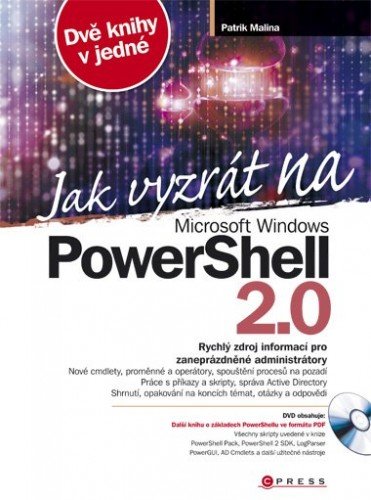
Jak vyzrát na Microsoft Windows PowerShell 2.0
Author: Patrik Malina
19,96 €
Jak vyzrát na Microsoft Windows PowerShell 2.0 is Patrik Malina’s technical guide for administrators who want to use PowerShell for scripting and automated Windows management. It moves from commands and scripts to services, events, user accounts, groups, certificates, networks, shared folders, and Active Directory. Practical examples, summaries, and review questions support the explanations. As the book is tied to PowerShell 2.0 and the Windows environment of its time, readers working with current systems should expect significant differences from today’s versions.
Jak vyzrát na Microsoft Windows PowerShell 2.0 is Patrik Malina’s technical guide to scripting and automated Windows administration. The author explains running commands and scripts locally and remotely, and covers managing services, accounts, groups, certificates, network configurations, shared folders, and printers. Separate topics include Active Directory, Group Policy, and database work. Practical examples, summaries, and review questions complement the explanations.
Book information
- Author
- Patrik Malina
- Publisher
- Albatros Media a.s.
- Imprint
- Computer Press
- Formát
- E-book
- Language
- Czech
- Genre
- PowerShell, Windows, Administrácia, Programovanie
- ISBN
- 978-80-251-2732-2
- Publication date
- 1. January 2014
- Pages
- 464
- E-book formats
- EPUB (ISBN 978-80-251-3962-2) · PDF (ISBN 978-80-251-3961-5) · MOBI (ISBN 978-80-251-3963-9)
What is Jak vyzrát na Microsoft Windows PowerShell 2.0 about?
The book presents Windows PowerShell 2.0 as a tool for administrators who want to automate Windows management. It begins with commands and scripts, showing interactive, automated, local, and remote execution. Later sections cover events and services, certificates, local user accounts and groups, network configuration, and folder and printer sharing. More advanced chapters connect PowerShell with Active Directory and Group Policy and also address databases. Summaries follow subsections, while questions and answers at the end of chapters help readers check their understanding. The book specifically covers PowerShell 2.0 and the Windows infrastructure of its period, so substantial technological changes must be taken into account when working with current systems.
Themes and motifs
PowerShell 2.0
Commands, scripts, and the basic principles of using PowerShell in Windows.
Automation
Using scripts to simplify and automate administrative tasks.
Windows administration
Services, events, certificates, user accounts, groups, and other system areas.
Active Directory
Using PowerShell with the Active Directory service.
Network administration
Managing network configurations, shared folders, and other Windows networking components.
Practical learning
Examples, summaries, and review questions with answers support the explanations.
Who is this book for?
Primarily for Windows administrators and IT professionals who want to learn PowerShell 2.0 and use scripting to manage systems, networks, and Active Directory.
Book context
The first print edition was published by Computer Press in 2010. Bibliographic records list the title as Jak vyzrát na Windows PowerShell 2.0, while the cover title is Jak vyzrát na Microsoft Windows PowerShell 2.0. This guide is tied to PowerShell 2.0 and the administration of Windows systems of that period.
Otázky o knihe
What is Jak vyzrát na Microsoft Windows PowerShell 2.0 about?
The book teaches the use of PowerShell 2.0 for scripting, automation, and Windows system administration.
Who wrote the book?
The author is Patrik Malina.
Does the book cover Active Directory?
Yes. Topics include connecting PowerShell with Active Directory and working with Group Policy.
Does the book include practical scripts?
Yes. It uses practical examples, and supplier data also lists a companion supplement containing scripts from the book.
Is the book current for today’s PowerShell?
It specifically focuses on PowerShell 2.0 and the Windows environment of its period, so some methods and tools may differ considerably from current versions.
How many pages does this edition have?
This edition has 464 pages.
Which e-book formats are available?
The supplier lists EPUB, PDF, and MOBI.

Reviews
There are no reviews yet.